
In the bustling world of technology, cell geeks have emerged as the superheroes of gadget repair. With their expert knowledge and skills, they’ve mastered the art of fixing everything from shattered screens to malfunctioning batteries. This blog delves into their world, offering insights and expert repair tips that even beginners can comprehend.
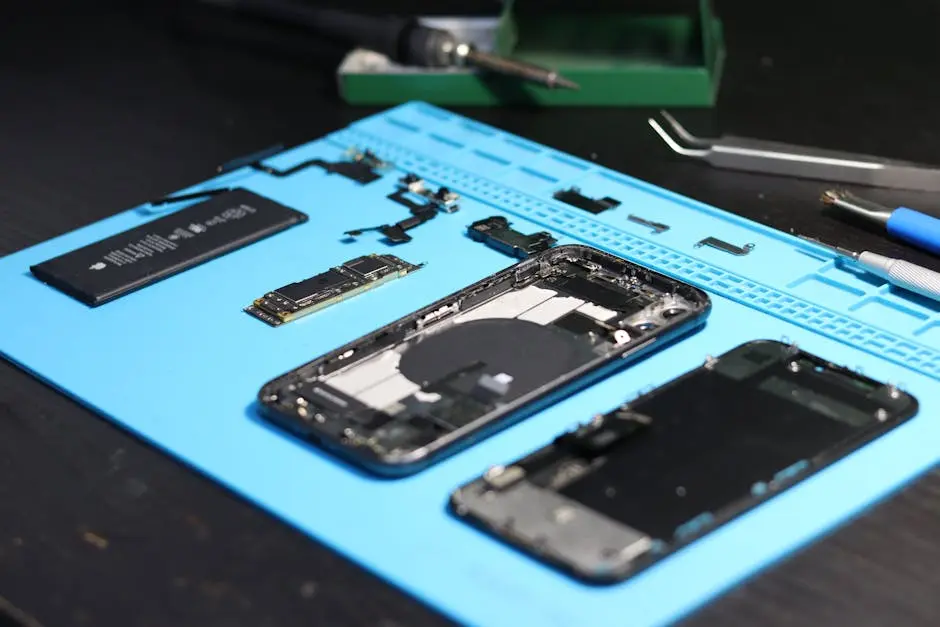
Understanding the Essential Tools of the Trade
Every cell geek knows that having the right tools is half the battle. From precision screwdrivers to specialized spudgers, understanding the purpose of each tool in a repair kit can greatly enhance your repair game. Let’s explore the must-have items that no repair technician should be without.
Precision tools are vital for a successful repair. A quality set of miniature screwdrivers can make opening your device and handling tiny screws a breeze. Alongside these, a set of tweezers becomes indispensable for gripping small connectors and manipulating minute components without causing unintended damage.
For those stubborn glued components, a heat gun becomes an essential part of your toolkit. By directing hot air precisely, you can loosen adhesive bonds without compromising the integrity of the surrounding parts. This method is particularly useful when dealing with stubborn seals on water-resistant devices.
Diagnosing Common Cell Phone Issues
Before diving into repairs, it’s crucial to accurately diagnose the issue. Whether it’s an unresponsive touchscreen or a battery that won’t charge, identifying the problem is the first step. We’ll walk through some frequent smartphone issues and how to pinpoint them effectively.
An unresponsive touchscreen often stems from software glitches rather than hardware damage. Restarting the device or performing a soft reset can sometimes restore functionality. For more stubborn cases, recalibrating the display settings might resolve the issue, but always ensure your software is up to date to avoid unnecessary problems.
Connectivity issues, such as Bluetooth or Wi-Fi troubles, can frequently be resolved by toggling the connection settings or restarting the router. Other times, it’s about diving into the device’s settings and understanding whether a configuration tweak is necessary to restore smooth operation.
Expert Tips for Screen Replacement
Replacing a damaged screen is a rite of passage for every cell geek. While it can seem daunting, with the right approach and tools, it’s a manageable task. Here, we’ll detail a step-by-step guide to screen replacement, ensuring a smooth and bubble-free finish.
First, power down the device and use a pentalobe screwdriver to remove the screws from the base plate. Use a suction cup to gently lift the screen, sliding a plastic spudger under the edge to break the adhesive seal. This careful precision prevents any excess stress on the device’s frame or other components.
Remember to note the placement of each screw and connector you remove. Misplacing them can complicate reassembly, especially if they differ in length or diameter. Some online guides recommend creating a template using masking tape to keep these tiny pieces organized. Once the new screen is in place, perform a soft reset to aid the calibration process.
Battery Troubleshooting and Solutions
A common issue many faces is a battery that drains too quickly or fails to hold a charge. Understanding the intricacies of battery health and how to test it can save time and extend your device’s life. Learn practical strategies to troubleshoot and fix battery-related problems.
To assess your battery’s health, dive into the settings to check battery usage statistics. This data reveals which apps or processes are consuming the most power, helping you identify unnecessary drains and guiding effective solutions such as closing apps or switching to low-power mode to maximize your battery life.
If your battery retains minimal charge, consider calibrating it by fully draining the battery followed by a complete charge cycle. This process, according to battery experts, helps reset the device’s internal power gauge, providing more accurate readings of your battery’s capacity and health.
Keeping Your Device Running Smoothly
Prevention is better than cure, and in the world of tech, maintaining your device can preempt a lot of issues. Discover daily habits and tips to keep your smartphone in top shape, ensuring a lasting and smooth user experience.
Regular software updates come with essential patches that address bugs and improve security, so always keep your device’s operating system current. Additionally, dull performance often results from bloated storage; routinely clear cached data and delete unused apps to free up memory and keep everything running swiftly.
Investing in quality screen protectors and cases preserves your device’s exterior from accidental drops or scratches. Small investments in protective accessories can significantly reduce the risk of damage, providing peace of mind and longer-lasting device performance.
Wrapping Up Your Journey Into Cell Repair
Navigating the world of cell geeks reveals the depth of expertise and creativity involved in gadget repair. By understanding their techniques and insights, anyone can begin to appreciate the art of cell repair. So, whether you’re a budding technician or just curious about your device’s inner workings, these tips and tricks can be your guide.

